StintKeep
A shift tracker for people whose hours are their pay — live while you work, signable when you finish.
- Product design, iOS engineering
- Swift 6 · SwiftUI · SwiftData · ActivityKit · App Intents · WidgetKit · StoreKit 2
- iOS 18+
- 2026
Executive summary
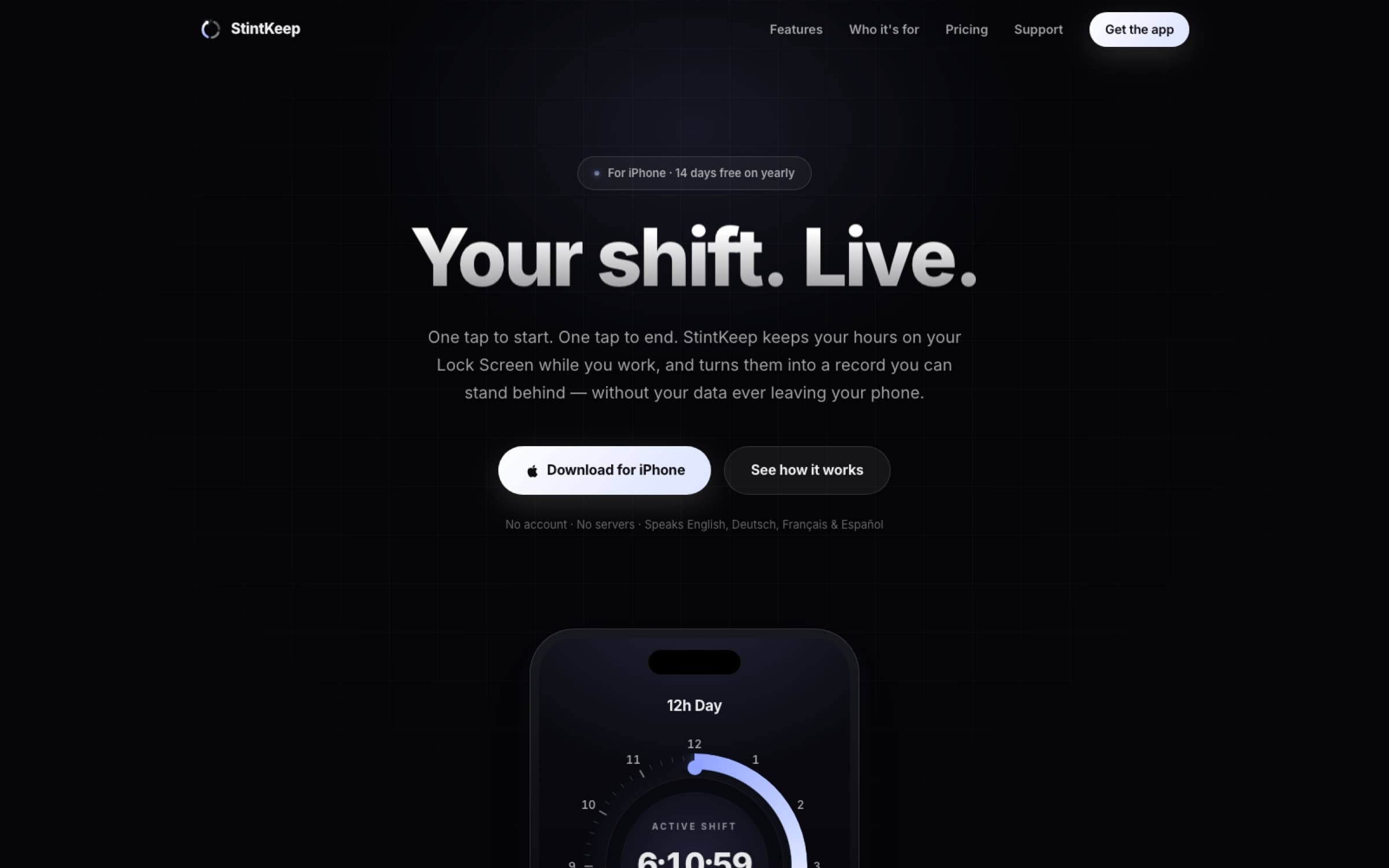
StintKeep is an iOS shift tracker for people whose hours are the thing they get paid for — nurses, paramedics, hospitality staff, drivers, contractors, anyone whose week is not a fixed nine-to-five. One tap starts a shift; it then lives on the Lock Screen and in the Dynamic Island while it runs; and when it ends it becomes a record with a signature line that a person can hand to a manager, an agency or a payroll department.
I designed and built it end to end — domain model, design system, four localisations and the App Store listing. The defining constraint is that it has no backend at all: no account, no servers, no analytics, nothing to breach.
"Your shift. Live."
— StintKeep's hero line
- 16+
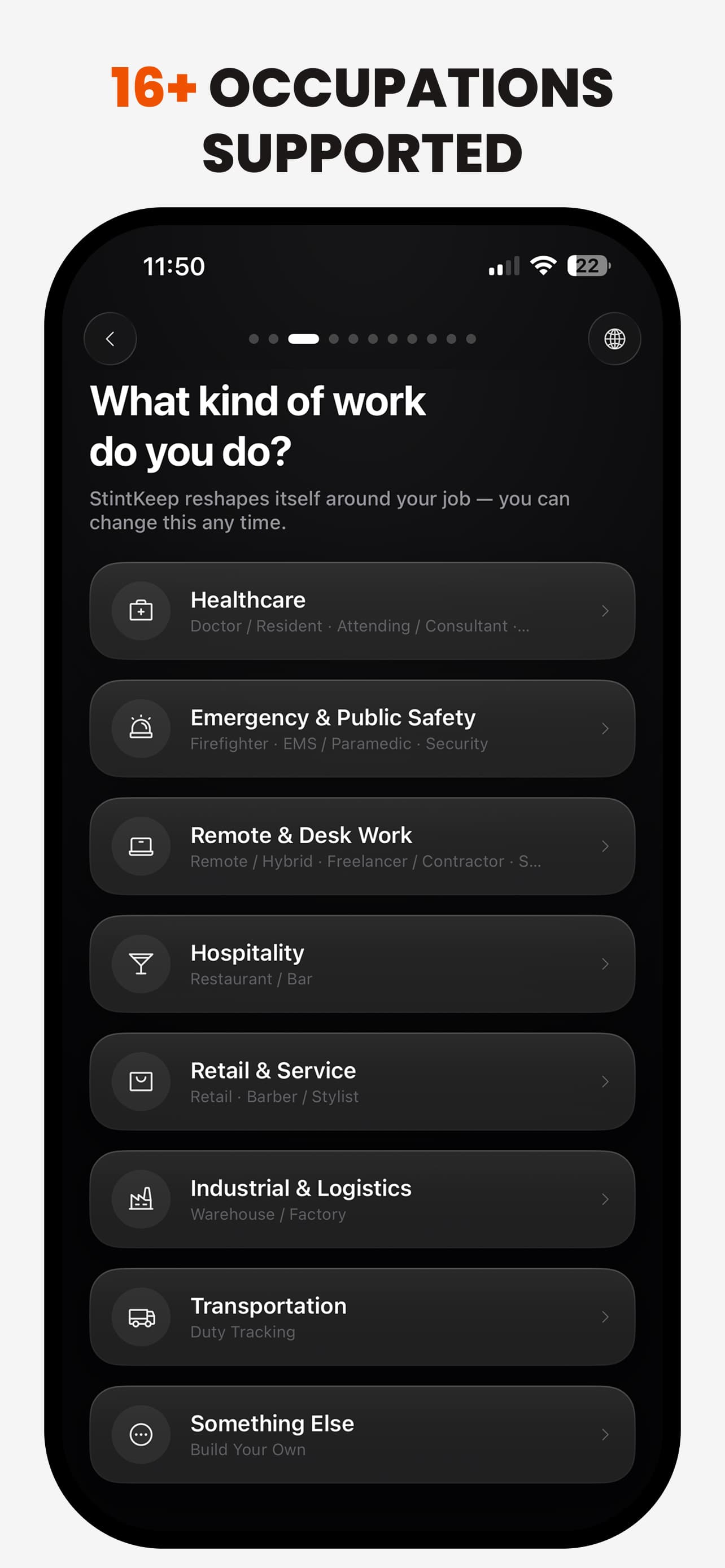
- occupations with their own vocabulary
- 4
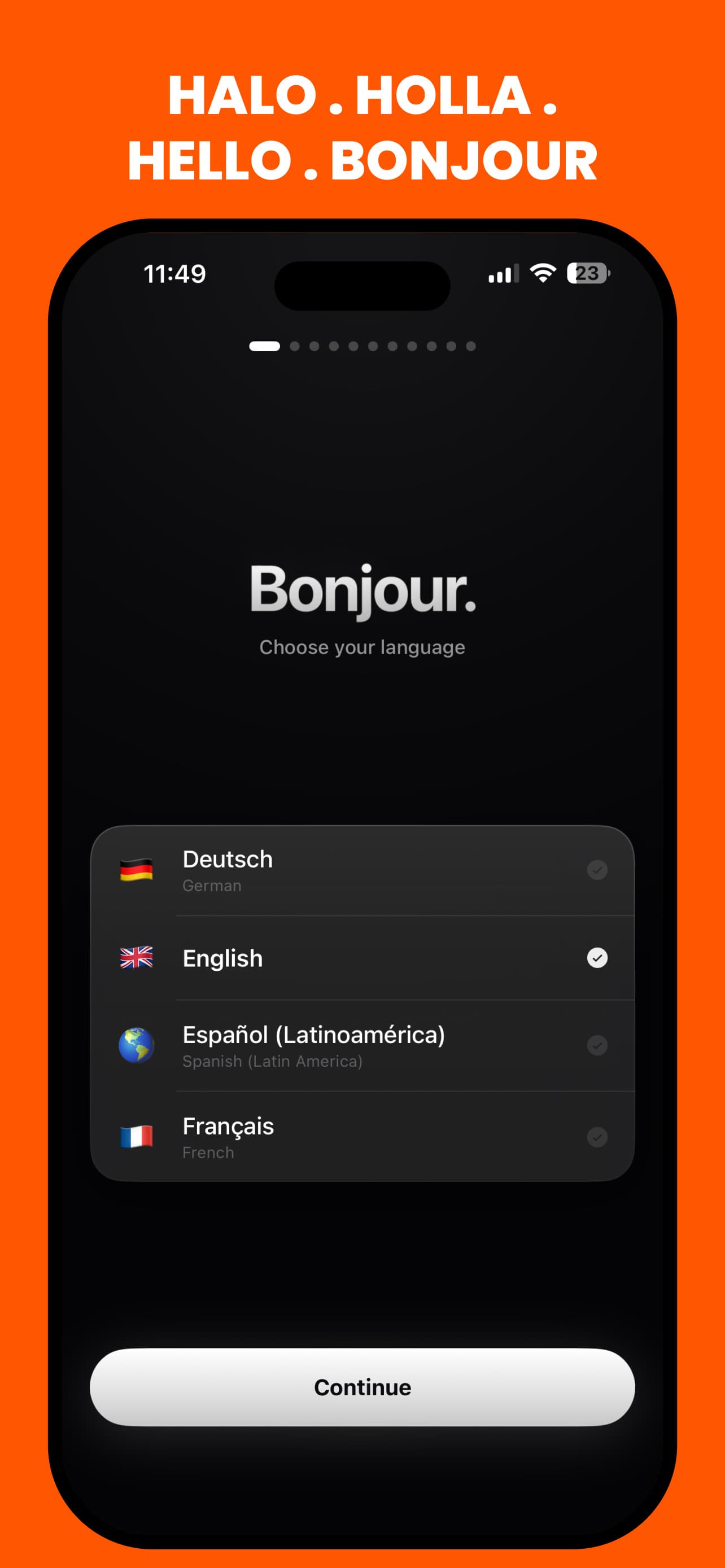
- languages: EN, DE, FR, ES-419
- 0
- servers, accounts or third-party SDKs
- 1 tap
- to start, from the Action Button
Product context
Shift workers are paid on a number that somebody else calculates, from a record they usually cannot see. When the number is wrong — an unpaid handoff, a night that ran three hours over, a break that was never actually taken — the burden of proof lands on the person with the least infrastructure: a photo of a rota, a note in Notes, a memory of a Tuesday six weeks ago.
The existing tools split into two unhelpful halves. Employer time-and-attendance systems are systems of record for the employer, not the worker. Consumer time trackers are built for freelancers billing clients — projects and invoices, not nights, on-call, handoffs and unsocial-hours premiums.
- Healthcare and emergency staff, whose shifts have handoffs, on-call and night differentials that a start/stop timer flattens into one number.
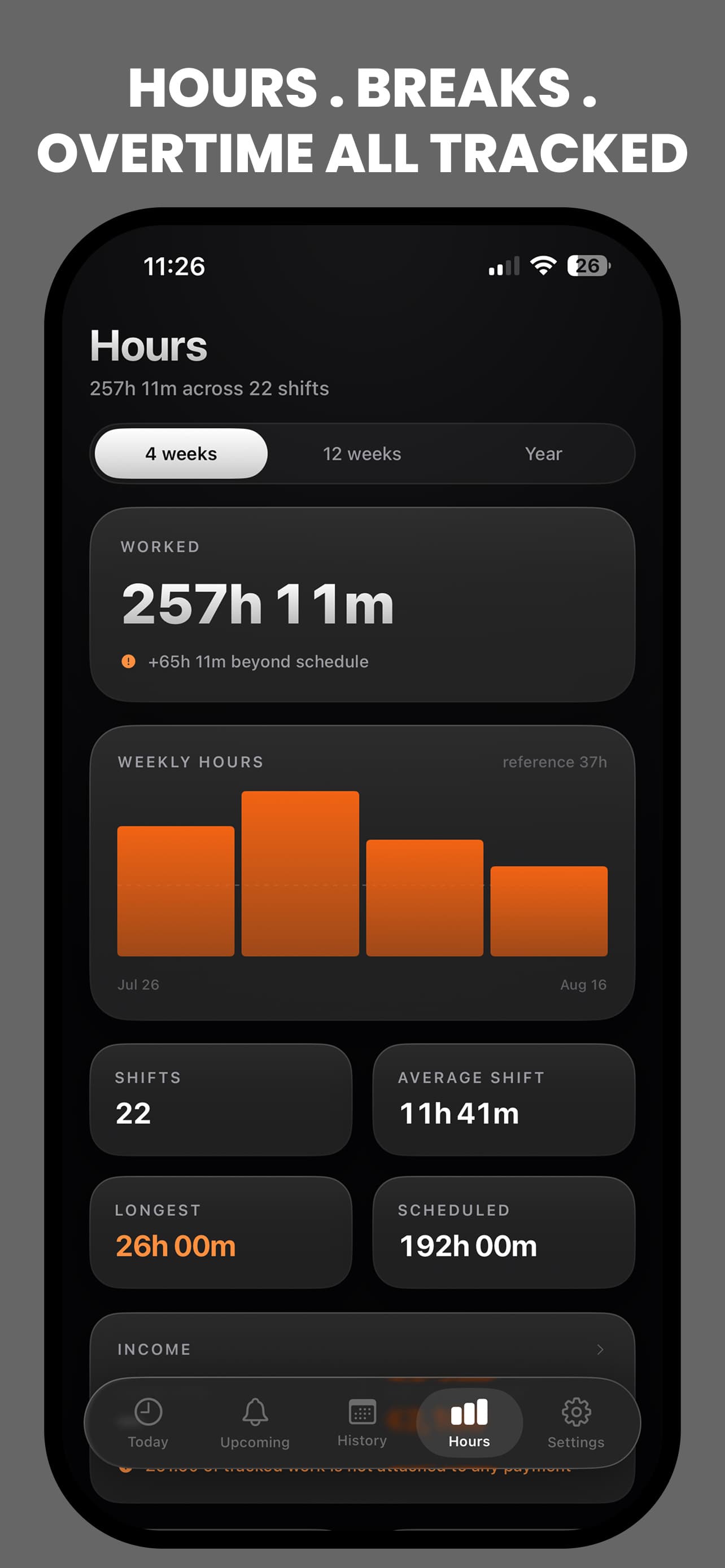
- Hospitality, retail and logistics workers, where the dispute is usually about breaks and overtime rather than the shift itself.
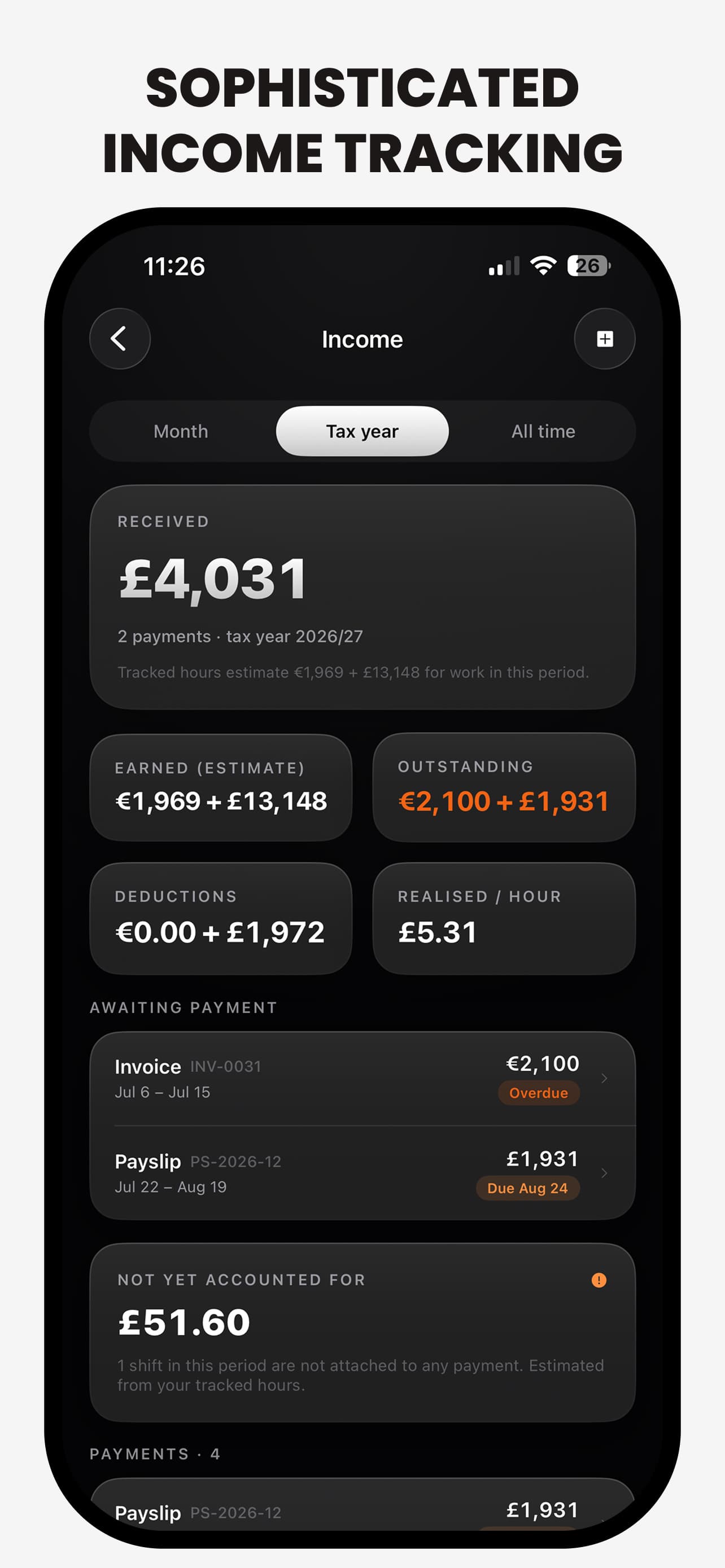
- Anyone tracking their own hours against what they were paid — which is why income estimation is built in, and why the export is designed to be read by somebody else.
The app says, in onboarding and in the report footer, that it is tracking only — not compliance. It does not claim to satisfy working-time regulations in any jurisdiction, and it does not present itself as a legal instrument. That sentence closed off a large, tempting feature space, and keeping it closed is what lets the rest of the product be honest about what it actually is: the worker's own record, kept well.
The record model
One rule sits under the entire domain: a shift is a container, and its duration is derived from its segments. Timestamps are the source of truth, and a running counter is never persisted.
That sounds like an implementation note. It is actually the product decision, because it is what makes a shift reconstructable rather than merely displayed. The phone can be killed by the OS mid-shift, cross a timezone, or sit in a pocket for fourteen hours, and the record still resolves correctly afterwards — which is the whole promise of a tool you are supposed to be able to stand behind.
| Segment | What it is | Why it is modelled separately |
|---|---|---|
| Work | The default — time on the job | Paid, counts toward the shift |
| Paid break / unpaid break | Two separate segment types | Only one of them reduces the payable total; conflating them is how a tracker quietly under- or over-reports |
| On-call (active) | Called in while on standby | Distinguishes being available from being engaged, which are usually paid differently |
| Handoff | The overlap at the start or end of a shift | Real, frequently unpaid, and almost never captured by a start/stop timer |
| Travel | Between sites | Payable in some occupations, not in others — so it is its own line rather than folded into work |
| Training / remote / other | Everything else that is not plain shift work | Keeps the catch-all from becoming the most-used category |
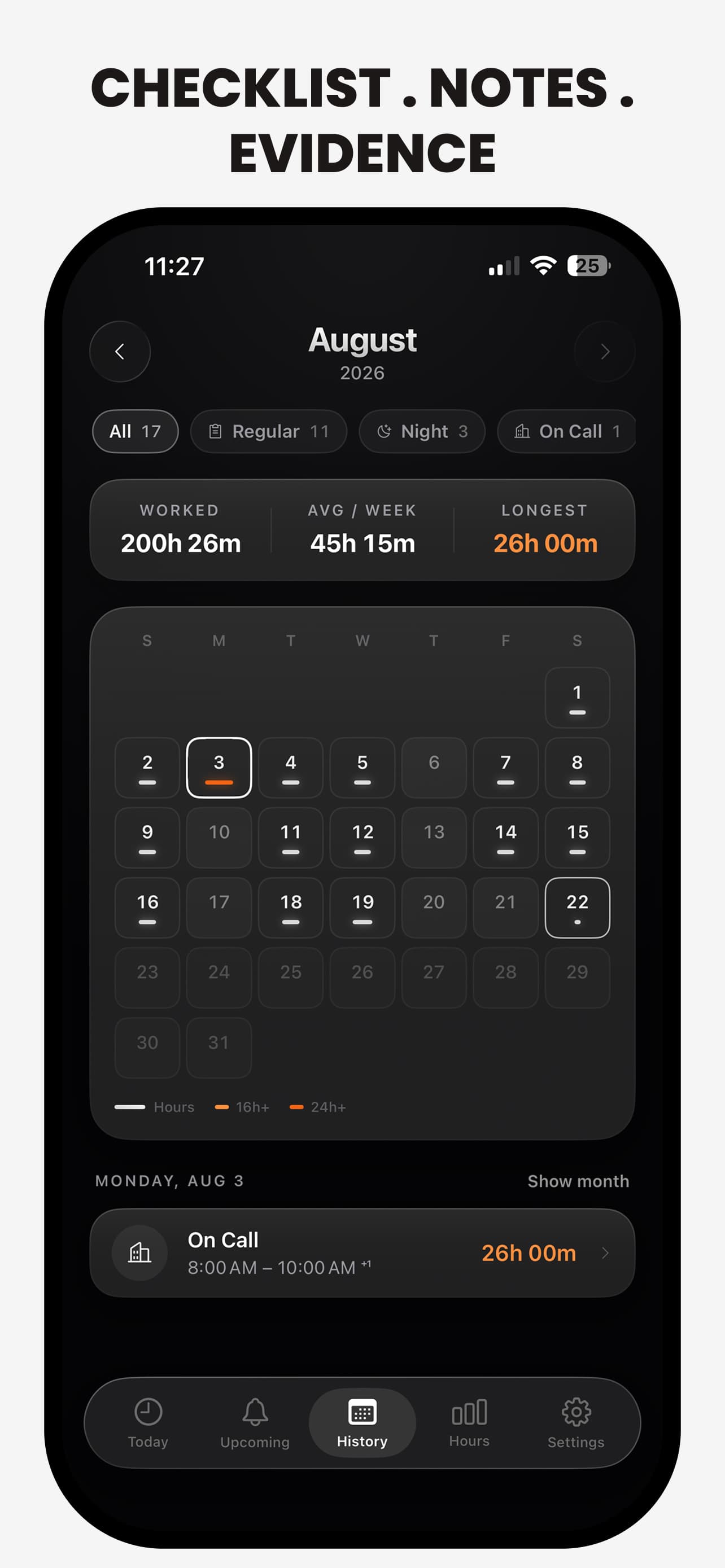
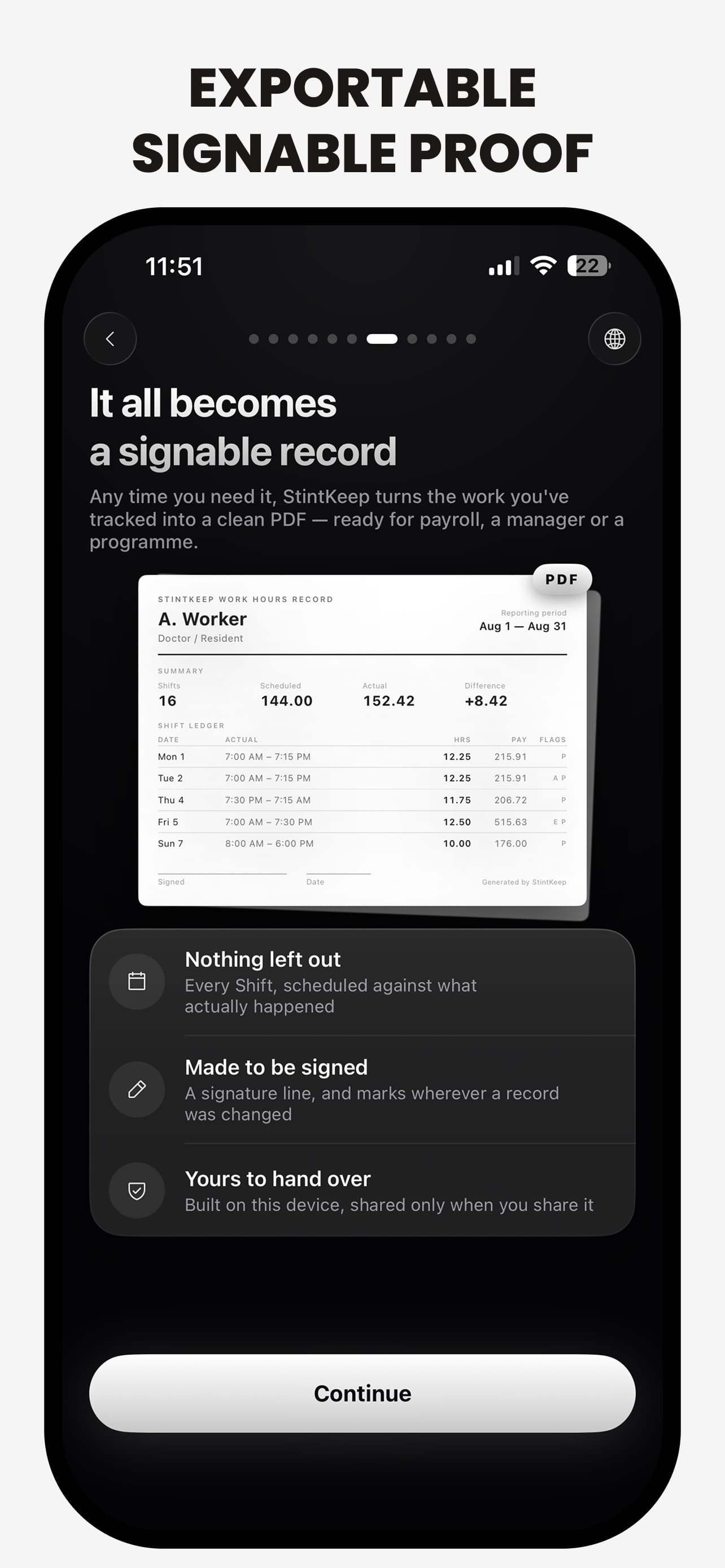
When a completed record's meaning changes, the app writes an amendment — what field, from what, to what, when. Editing a shift while it is still running is not an amendment; that is the shift still happening. Nothing here ever blocks a change; it only records that one was made, and a no-op save never manufactures history.
There is deliberately no grace period after a shift ends. Correcting an end time one minute after stopping is a real change to a completed record, and quietly excusing it would put the app in the business of deciding which corrections count. The exported report carries a signature line and marks wherever a record was changed — so the document is honest about its own edits rather than presenting a clean surface over them.
Work modes
The same object is called a shift, a duty, a stint, a run or a tour depending on who you ask — and getting that word wrong is the fastest way to feel like an app was built for somebody else.
So the domain is profession-neutral and the vocabulary is a layer on top. The internal shift kinds — regular, night, on-call, duty, standby, overtime, training — carry only neutral fallback labels, and every user-facing noun comes from the Work Mode chosen during onboarding. Picking "Healthcare" rather than "Transportation" changes the words, the default shift types, and the templates — not the schema.
Two consequences fell out of that. First, adding an occupation is content, not a migration. Second, nothing in the interface may hardcode a user-facing noun — including the Live Activity, which has to render the right word without the widget knowing that Work Modes exist at all. Old records survive a rename because unknown raw values resolve to the nearest current kind rather than failing.
Key screens
Design system
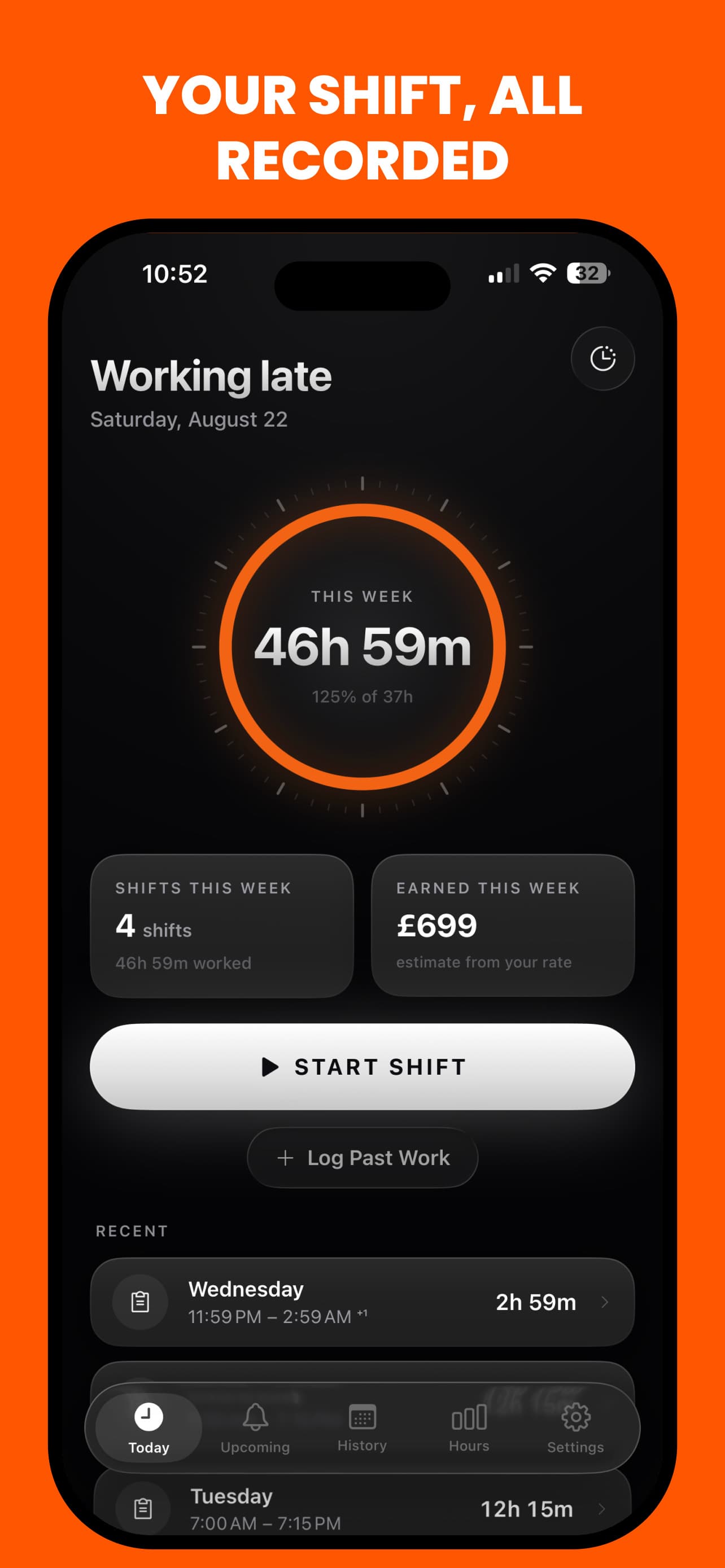
Two worlds, one system. Idle is a near-black canvas with cool restraint; active is a centre-lit canvas with a white dial and raised glass panels. The typographic register throughout is SF Pro, tight tracking, hard contrast, and quiet uppercase micro-labels reserved for genuine metadata.
Ink
#040405
The canvas
Aurora deep
#8FA2FF
Time that is running
Aurora mid
#C3D0FF
The arc's body
Aurora pale
#EEF3FF
Its leading edge
Ember
#F26414
Approaching a limit
Amber
#FF9040
Over a limit
Chrome is grayscale. The one hue in the system — a periwinkle that burns to white at the arc's leading edge — is reserved for time that is running, never for chrome and never for anything static. Warm tones appear only as warnings. The result is that any colour on screen is information, so the eye learns to trust it.
- One divider weight for the whole app. Three files had drifted to three different border-t border-line opacities, and the eye reads that drift as cheapness long before it can name it.
- The display sheen — white falling to warm silver — is for screen titles and hero numerals only. Body text in a gradient is decoration, and decoration is what this system refuses.
- The active canvas gets its light from a radial bloom behind the dial rather than from the gradient ramp, because a bright linear stop reads as a horizontal band across the screen.
- Dark-only, set in the Info.plist rather than as a preference. A light branch would never execute, and keeping one would imply a light theme the white foregrounds could not honour.
Privacy architecture
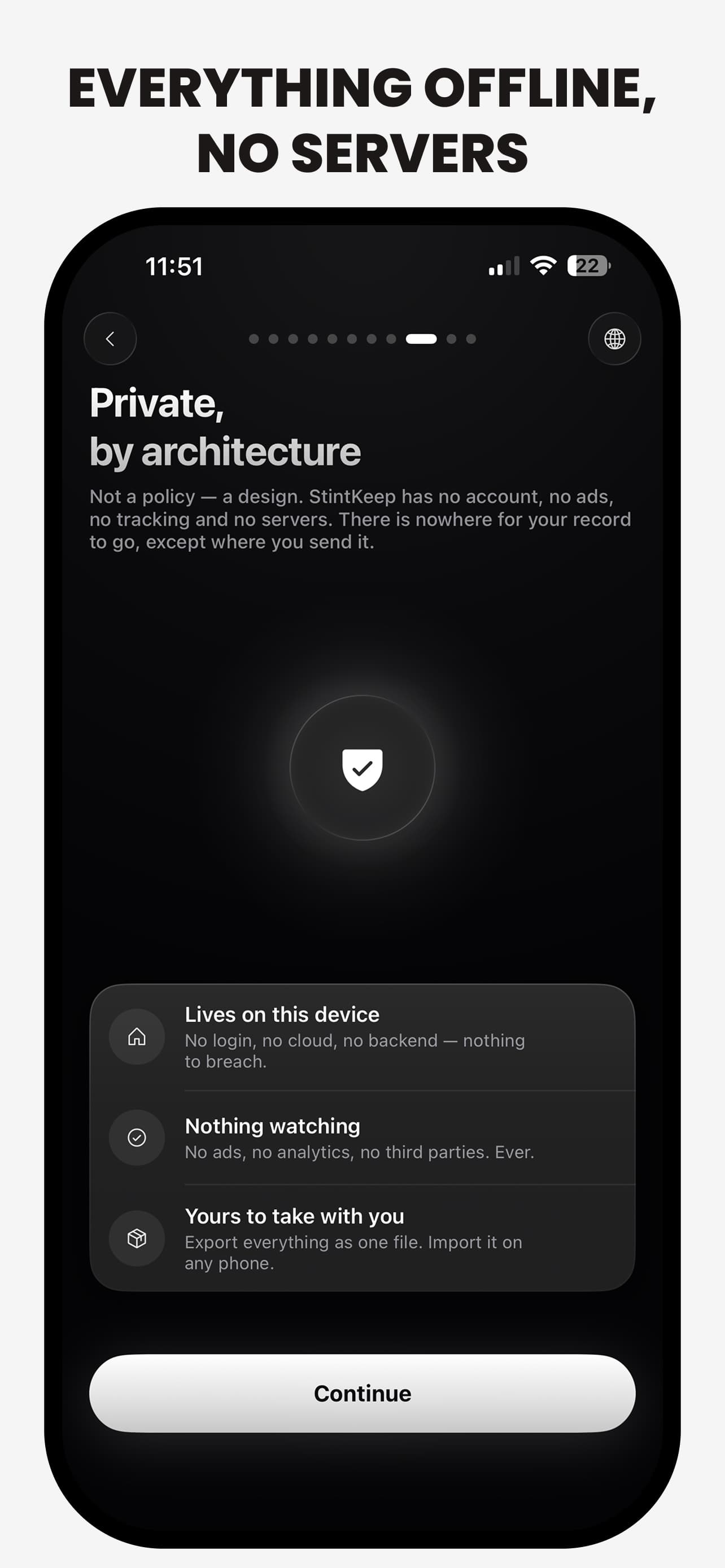
"Private by architecture" is the claim, and the point of the phrasing is that it is checkable. There is no account system, no network layer touching user data, no analytics SDK and no third-party dependency that could acquire one.
- Everything lives in SwiftData on the device. There is no sync path, so there is no server-side copy to subpoena, sell, or lose.
- Backup is therefore a real feature rather than an afterthought: export everything as one file, import it on any phone. The single third-party dependency in the project is a zip reader, because Foundation can produce an archive on iOS but cannot read one back — and hand-rolling that would mean owning path-traversal and decompression-bomb handling for a file that can arrive from anywhere.
- Rates and income figures never leave the device either, which is why the onboarding says so explicitly at the moment it asks for them.
- The trade is stated plainly in onboarding: it leaves the app, never leaves you — and if the phone is lost without a backup, so is the record.
Key design decisions
| Decision | Rationale | Trade-off accepted |
|---|---|---|
| No account, no server, no sync | The data is where you were, when, and for how long — a movement log of a person's working life. The safest place to put that is nowhere: a product with no backend cannot leak one, and the privacy claim becomes architectural rather than a promise in a policy. | No cross-device continuity and no server-side recovery. Losing the phone without an exported backup loses the record, so backup had to become a first-class, explicitly-taught feature. |
| Timestamps are the source of truth; never persist a running counter | A counter drifts across backgrounding, device sleep, timezone changes and crashes. Derived duration is correct after any of those, and it makes the running shift reconstructable rather than merely displayed. | Every surface that shows elapsed time has to derive it, so nothing can be read straight out of the model — the arithmetic lives in one engine and every view has to go through it. |
| Amendments record a change, but never block one | This is a record a person may need to stand behind. History with holes in it is worse than no history — but an app that refuses an edit teaches people to keep the real numbers somewhere else. | Correcting a typo one minute after ending a shift writes an amendment, which can feel pedantic. Deliberately so: a grace period would put the app in the business of deciding which corrections count. |
| Profession-neutral domain, profession-specific words | A shift, a duty, a stint and a run are the same object with different vocabularies. Modelling the vocabulary into the enum would have meant a schema change per occupation supported. | The internal enum names are meaningless to users, so every surface must pass through the Work Mode's terminology layer. Nothing can hardcode a user-facing noun. |
| Dark-only, with a single hue | The app is most often opened at 03:00 in a corridor, and its subject is time passing. Grayscale chrome with one reserved hue means a colour in the interface always means something. | No light theme, and no branch that could support one — the white foregrounds everywhere else could not honour it. |
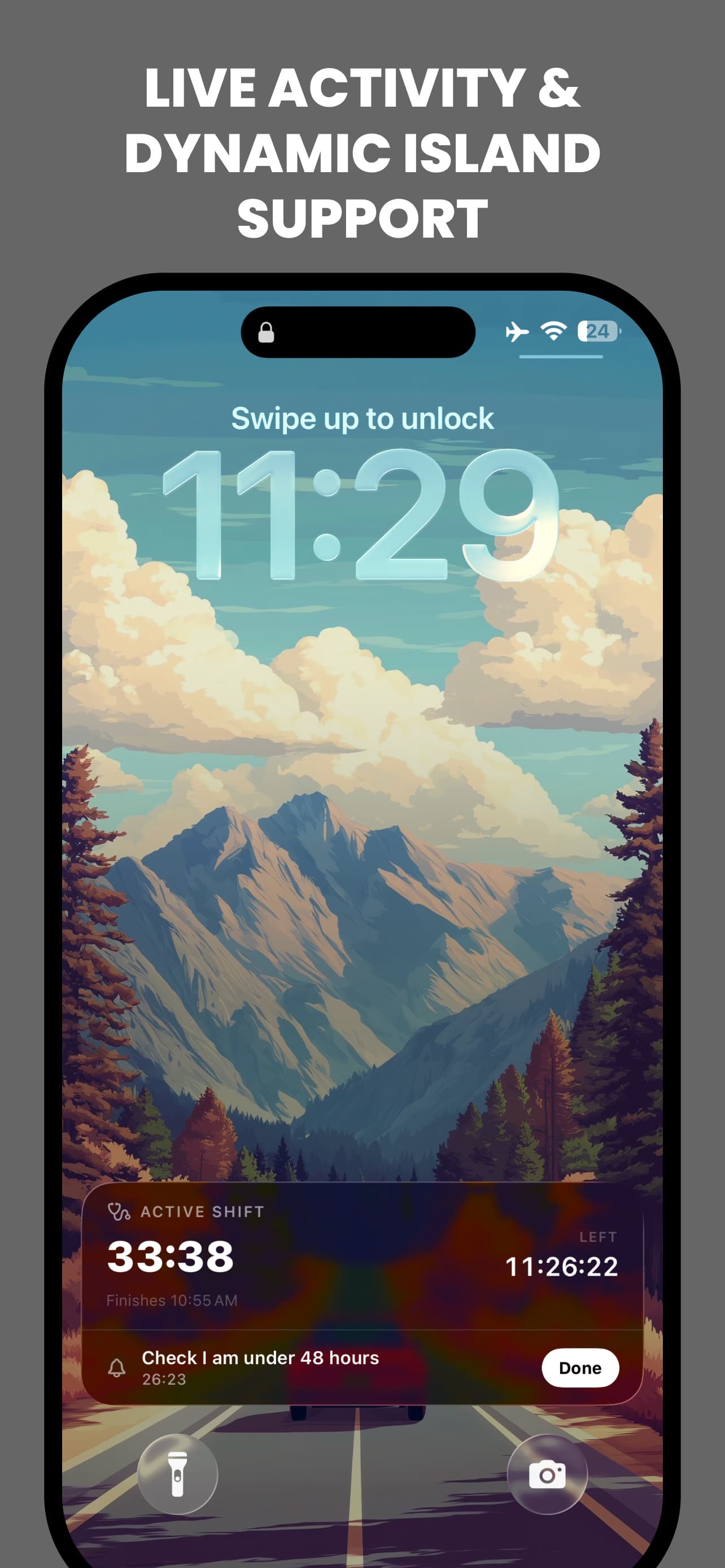
| The Lock Screen is the primary surface while a shift runs | During the shift itself the phone is in a pocket. A Live Activity and Dynamic Island make the running record glanceable without unlocking, which is the difference between a tool that gets used and one that gets remembered afterwards. | Widget and app must agree on state derived from the same timestamps, and the Island's content has to follow the Work Mode without the widget knowing Work Modes exist. |
Challenges & trade-offs
Designing for a screen nobody looks at
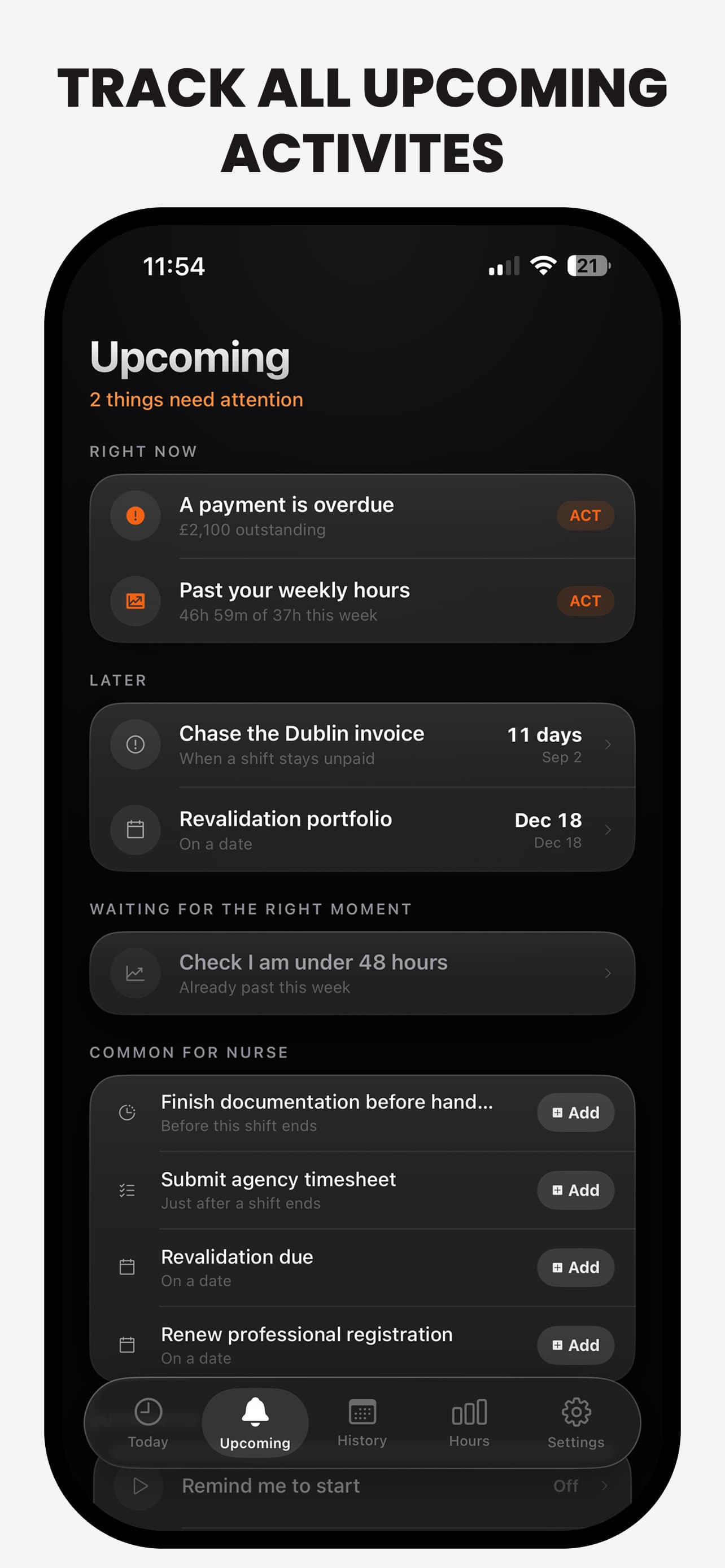
The hours a shift worker most needs recorded are the hours they are least able to hold a phone. That pushed the real interface out of the app and onto the Lock Screen, the Dynamic Island and the Action Button — surfaces with severe layout constraints, no scrolling, and a content budget of roughly two values. Choosing which two, per Work Mode, was more design work than the Today screen itself.
Neutrality costs vocabulary everywhere
A profession-neutral domain means no screen, widget, notification or intent may contain a literal user-facing noun. Every string goes through the terminology layer, in four languages — and a missed one does not crash, it just quietly says "shift" to a paramedic who chose "duty". Catching that class of bug is a review discipline, not a compiler guarantee, which is the part I would most like to make structural next.
No backend is a feature until the phone breaks
The privacy position is the product's spine and its single biggest usability liability. There is no "sign in on the new phone" — there is only the backup the user did or did not make. The mitigation is to teach export during onboarding rather than bury it in settings, and to make the exported file a plain, portable archive rather than an opaque blob. It is a real trade, and the honest version of this case study says so rather than presenting the privacy line as costless.
What's next
- Making the terminology guarantee structural — a lint or type-level rule that makes a hardcoded user-facing noun fail the build rather than fail a review.
- More Work Modes, since each one is now content rather than a schema change — with the vocabulary drawn from the occupations that actually download the app.
- A watch companion, where starting and ending a shift is the entire interaction and the phone can stay in the pocket.
- Deeper reporting for the dispute case: a per-period breakdown that answers the specific question a payroll department asks, rather than a general export they have to interpret.
Psalm Path
A quiet, offline Christian companion: Scripture, prayer and a short daily practice that accumulates into an archive of your own walk. No feed, no streaks to lose.